How to use SikuliX API in your JAVA programs or Java aware scripting
The core of SikuliX is written in Java, which means you can use the SikuliX API as a standard JAVA library in your program.
This applies to any Java aware scripting environment like Jython, JRuby, Scala, Groovy, Clojure and more, where you write your scripts in other IDE’s and run them using the respective runtime support directly.
NOTE: When using the scripting support provided by the SikuliX IDE and when running Jython/JRuby scripts from command line using SikuliX, it is automatically taken care, that a basic path is setup, where SikuliX will look for image files, that are given only by their name (no path given).
For information what you can do when using the Java API to have this convenience too, look here SIKULI_IMAGE_PATH.
After having setup SikuliX on your system, as recommended at Getting started, you have to do the following:
1. Include sikulixapi.jar in the CLASSPATH of your Java project.
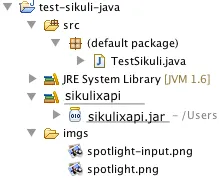
Section titled “1. Include sikulixapi.jar in the CLASSPATH of your Java project.”After adding sikulixapi.jar as a library reference into your project, the project hierarchy in Eclipse might look like this:
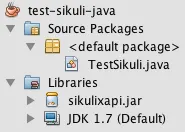
The same in Netbeans:
Project view
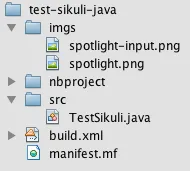
Files view
2. Import the Sikuli classes you need
Section titled “2. Import the Sikuli classes you need”You can simply use
import org.sikuli.script.*;or import the classes you need:
import org.sikuli.script.Screen;In most cases, you would need at least Screen and/or Region.
Other candidates are Pattern, Match, Location, App and some more.
3. Write code!
Section titled “3. Write code!”More basic usage information is available here.
Here is a hello world example on Mac. The program clicks on the spotlight icon on the screen, waits until spotlight’s input window appears, activates it by clicking and then writes “hello world” into the field and hits ENTER.
import org.sikuli.script.*;
public class TestSikuli {
        public static void main(String[] args) {                Screen s = new Screen();                try{                        s.click("imgs/spotlight.png");                        s.wait("imgs/spotlight-input.png");                        s.click();                        s.write("hello world#ENTER.");                }                catch(FindFailed e){                        e.printStackTrace();                }        }
}
A comment on projects using Maven
Section titled “A comment on projects using Maven”It is planned, to publish sikulixapi.jar version 1.1.0+ on MavenCentral, so having a dependency in your project pom would be sufficient.
The coordinates: <groupId>com.sikulix</groupId>
<artifactId>sikulixapi</artifactId>
<version>1.1.x</version>
Snapshots of developement head can be loaded from OSSRH
they are created daily (most of the time ;-)
use this repository setting: <repository>
<!— OSSRH: com.sikulix —>
<id>com.sikulix</id>
<name>com.sikulix</name>
<url>https://oss.sonatype.org/content/groups/public\
<layout>default</layout>
<snapshots>
<enabled>true</enabled>
<updatePolicy>always</updatePolicy>
</snapshots>
</repository>
and as version use:
<version>1.1.x-SNAPSHOT</version>
Other valuable information
Section titled “Other valuable information”Be aware, that some method signatures in the Java API differ from the scripting level.
How to use images stored in jar files
Section titled “How to use images stored in jar files”For the basic ImagePath features see: SIKULI_IMAGE_PATH
The prereqs:
- the jar file containing the images must be on classpath at runtime
- it must contain at least one valid java class file
This is always fulfilled, if the running jar itself contains the images to be used.
An example:
lets assume:
- the class file is mypackage.ImageContainer
- the images are stored in the folder images, being at the jar’s root folder level
the jar file should look like this mypackage (optional)
ImageContainer.class
images
image1.png
image2.png
the standard Maven project setup would be pom.xml
src
main
java
mypackage
ImageContainer.class
resources
images
image1.png
image2.png
In other non-Maven project setups in NetBeans, Eclipse and other IDE’s this might look different. But what counts is the final position of the images folder in the resulting jar file relative to it’s root.
This would try to load image files from the jar file of the given class name, supposing the jar packaging during project build produces a jar like this:
TestSikuli.class
images
spotlight.png
spotlight-input.png
import org.sikuli.script.*;
public class TestSikuli {
        public static void main(String[] args) {                Screen s = new Screen();                ImagePath.add("TestSikuli/images")                try{                        s.click("spotlight.png");                        s.wait("spotlight-input.png");                        s.click();                        s.write("hello world#ENTER.");                }                catch(FindFailed e){                        e.printStackTrace();                }        }
}
As a goody you might use the SikuliX IDE to manage your image folders inside your java projects.
Just capture the images and save the “script” appropriately (e.g. as images.sikuli) in your project structure in a suitable place and add the path to your java program having the jar file on the class path at runtime.
Taking the above ImageContainer example ina Maven context:
project structure: pom.xml
src
main
java
mypackage
ImageContainer.class
resources
images.sikuli
images.py
spotlight.png
spotlight-input.png
The ImageContainer class need not have any features, but must be valid (compileable).
Have the resulting jar on classpath at runtime and access the images just using their base names:
import org.sikuli.script.*;
public class TestSikuli {
        public static void main(String[] args) {                Screen s = new Screen();                ImagePath.add("ImageContainer/images.sikuli")                try{                        s.click("spotlight.png");                        s.wait("spotlight-input.png");                        s.click();                        s.write("hello world#ENTER.");                }                catch(FindFailed e){                        e.printStackTrace();                }        }
}